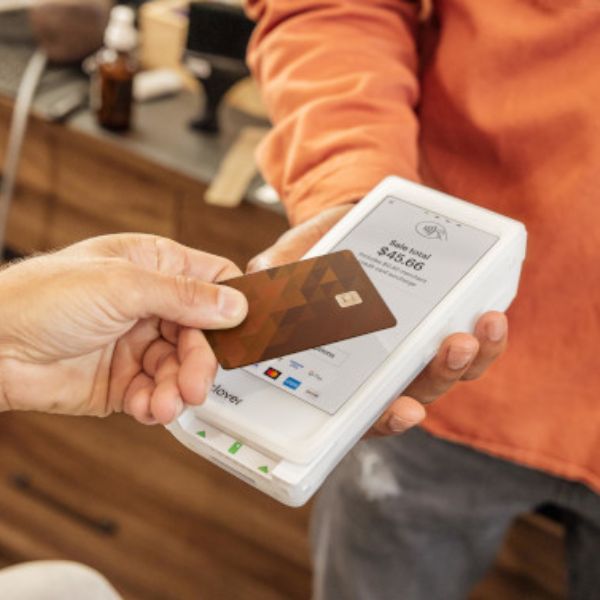

In today’s world, your customers expect you to meet them where they are—at the counter, at the table, at the door, or even out in the field. That’s exactly where the Clover Flex comes in. It’s a compact, handheld point-of-sale (POS) device that accepts modern payments, runs key apps, and keeps you connected to your business, all from the palm of your hand.
Whether you’re a restaurant, retail shop, taxi service, home contractor, or mobile service business in Canada, Clover Flex can act as your all-in-one POS, payment terminal, and mini-business hub.
What Is The Clover Flex 4?
Clover Flex is a portable POS terminal designed to be small enough to carry, but powerful enough to run your day-to-day operations. It combines:
- A nearly 6" colour touchscreen
- A built-in receipt printer
- A barcode scanner / camera
- Support for chip, tap, and swipe payments, including Apple Pay®, Google Pay™, and Samsung Pay™
- Wi-Fi and LTE connectivity for on-the-go use
- A battery designed for a full business day of typical use
Instead of being tied to a countertop, you can walk around with the device and take payments wherever your customers happen to be.
Key Hardware Features (In Plain Language)
Here’s what makes Clover Flex different from a basic card terminal:
1. All-in-one handheld device
You don’t just get a card reader. You get:
- Touchscreen for ringing in orders and viewing reports
- Built-in thermal printer for receipts
- Integrated barcode scanner for products, tickets, or inventory
- Camera for scanning QR codes and barcodes
This means fewer separate gadgets, fewer cables, and less clutter.
2. Modern payment options
Clover Flex accepts:
- Chip (EMV) cards
- Tap / contactless cards
- Magstripe (swipe) cards
- Mobile wallets like Apple Pay, Google Pay, and Samsung Pay
So wherever your customer’s card lives—plastic, phone, or watch—you can take the payment.
3. Battery built for a full shift
The device is built to handle a typical SMB workday on a full charge (“at least 8 hours” for typical SMB usage is often cited). No constant re-docking or fighting over power outlets.
4. Connectivity that moves with you
With Wi-Fi and LTE, you’re not stuck at the front desk or counter. As long as you have a connection, you can take payments virtually anywhere on site—or on the road.
Clover Flex vs. Flex Pocket (Quick Breakdown)
If you’ve heard about Clover Flex Pocket, here’s the simple difference:
- Clover Flex → Has a built-in printer (paper receipts + digital receipts)
- Flex Pocket → No printer, it’s digital receipts only (email/SMS)
Functionally, both can:
- Take contactless, chip, and other card payments
- Fire orders to the kitchen (in restaurant setups)
- Help with line-busting
- Pair with other Clover devices
- Manage daily operations
You’d typically choose Flex if you want physical receipts on the spot, and Flex Pocket if you’re comfortable going eco-friendly and fully digital.
Real-World Use Cases in Canada
Here are some practical ways Canadian businesses use a handheld POS like Clover Flex:
1. Restaurants & cafés
- Take orders and payments tableside, reducing back-and-forth to the terminal
- Split bills right at the table
- Turn more tables by speeding up the payment flow
2. Retail & pop-up shops
- Line-bust during busy periods (weekends, holidays, events)
- Serve customers anywhere in the store
- Take the device to markets, kiosks, or outdoor events
3. Service & trade businesses
- Contractors, home repair, cleaning services, and mobile pros can:
- Issue invoices on the spot
- Take payment immediately at the customer’s home or job site
- Avoid chasing payments later
4. Taxis, transportation & delivery
- Take card or tap payments inside the vehicle
- Email or print receipts instantly
- Offer customers a modern, professional payment experience instead of cash-only pickups
Software & Reporting: It’s Not Just a Card Machine
One of the biggest advantages of Clover Flex is that it links into the Clover cloud platform, meaning your data lives securely online and syncs across devices.
With the right plan and apps, you can:
- Track sales from anywhere (phone, laptop, or another Clover device)
- Monitor inventory with categories, labels, modifiers, and variants
- See employee performance, handle time tracking and permissions
- View detailed sales reports and tax summaries depending on your plan
This turns the device from “just a terminal” into a mini control centre for your business.
Clover Flex vs. Traditional Countertop Terminals
| Feature | Clover Flex (Handheld POS) | Traditional Countertop Terminal |
|---|---|---|
| Mobility | Fully portable, Wi-Fi/LTE capable | Usually fixed at one counter |
| Screen | Almost 6" touchscreen | Small monochrome or basic colour screen |
| Receipt Printing | Built-in printer + digital receipts | Printer sometimes separate |
| App Ecosystem | Clover apps, reporting, inventory, etc. | Very limited or no app ecosystem |
| Use Cases | Counter, tableside, curbside, delivery, fieldwork | Primarily at the checkout counter |
| Cloud Reporting | Full Clover Dashboard access | Often limited, sometimes batch-only reports |
Pros and Cons of Clover Flex
To keep it honest, here’s a quick overview.
Advantages
- Portable all-in-one unit (POS + printer + scanner)
- Accepts all major payment methods, including mobile wallets
- Great for line-busting, tableside service, and mobile work
- Integrates with other Clover devices (Mini, Station, etc.) for multi-terminal setups
- Access to Clover’s cloud dashboard, reports, and apps
Possible trade-offs
- Requires a Clover merchant setup (through Clover or a certified partner)
- There may be monthly software fees depending on the plan you choose
- More powerful than a basic terminal—so there’s a slight learning curve if staff are used to old machines
Common Questions About Clover Flex (FAQ)
1. If I take a payment on Clover Flex, will it show up on my other Clover devices?
Yes. Transactions taken on Flex show up on your other Clover devices that are configured as part of the same system, so your sales data remains synchronized.
2. Does Clover Flex include everything I need in the box?
For a standard Flex kit, you typically receive:
- Flex device
- Protective silicone sleeve
- Charging cradle
- Power brick & cord
- Quick start guide
- A starter roll of receipt paper
(Exact contents may vary by reseller/partner, so always confirm when you order.)
3. Can I accept Apple Pay and other digital wallets with Flex?
Yes. Clover notes that all new Clover devices, including Flex, support mobile wallet services like Apple Pay, Google Pay, and Samsung Pay.
4. Is there support if something goes wrong?
Clover offers help through:
- The Clover Dashboard (Help menu)
- The Help app on Clover devices
- Clover Go mobile app (Help section)
- Phone support via their support lines
Your exact support experience can also depend on which Canadian provider or ISO you buy Clover through.
How to Decide if Clover Flex Is Right for You
Clover Flex is usually a good fit if:
- You want to move around while serving customers
- You need a single device that handles more than just card transactions
- You appreciate cloud reporting, inventory tools, and employee controls
- You plan to grow into more Clover devices later (e.g., add a Clover Mini or Station at the counter)
It may not be ideal if all your transactions happen at a single, fixed till and your needs are extremely basic.
Final Thoughts
If you’re a Canadian business that wants a modern, handheld POS with powerful software behind it, Clover Flex is one of the strongest options in the market. It combines card acceptance, POS functionality, reporting, and mobility into one clean device—and lets you focus on serving customers instead of fighting with hardware.
At a glance
Device type: Handheld POS with built-in printer and scanner.
Ideal for:
- Busy restaurants & cafés
- Retail & pop-up shops
- Taxis, transportation & delivery
- Service & trade businesses
Key highlights
- Accepts chip, tap, swipe & mobile wallets
- Cloud reporting & Clover apps
- Wi-Fi and LTE connectivity
- Battery designed for a full business day
Next steps
Give us a call at 1-844-411-1011 Ext 101 or email Moise directly at moise@mobopay.ca