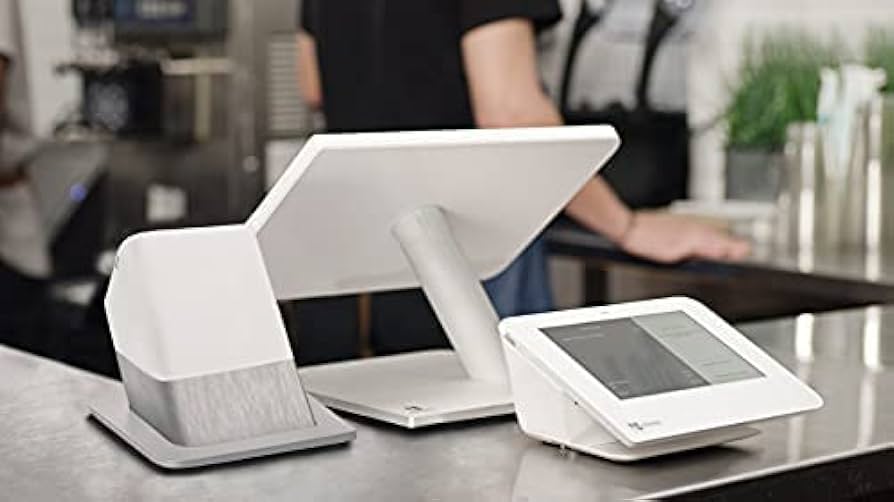
If Clover Flex is the handheld device you carry around, Clover Station Duo is the powerhouse that stays at the counter and drives your whole front-of-house. It’s a fixed, dual-screen POS designed for speed, clarity, and a smooth experience for both staff and customers.
Station Duo is ideal if you run a busy counter — quick-service restaurant, café, retail shop, or any high-volume checkout where you want staff to move quickly while giving customers a clear, professional payment experience.
What Is Clover Station Duo?
Clover Station Duo is a countertop POS bundle that includes:
- A large, staff-facing touchscreen for orders, payments, and reports
- A customer-facing display so shoppers can review items, tip, and pay
- A built-in thermal receipt printer
- Connectivity for cash drawers, barcode scanners, and peripherals
- Support for chip, tap, and swipe payments and mobile wallets
- Access to the Clover app marketplace and cloud reporting
Think of it as your main POS hub at the counter, with a clean, modern look that customers instantly recognize as a professional setup.
Key Hardware Features (In Plain Language)
Here’s what makes Clover Station Duo stand out versus a basic terminal or simple tablet:
1. Dual-screen setup
You get:
- A large staff screen for entering orders, applying discounts, and managing tickets
- A separate customer screen so customers can clearly see totals, select tips, and complete payment
This keeps staff focused on input and upsells, while customers see exactly what they’re paying for — with less back-and-forth.
2. Built-in printer and accessories
Clover Station Duo typically includes:
- A high-speed thermal receipt printer
- Support for cash drawers
- Options for barcode scanners and other peripherals
No DIY mix-and-match hardware — it’s designed as a single, cohesive station.
3. Modern payment methods
Station Duo accepts:
- Chip (EMV) cards
- Tap / contactless cards
- Magstripe (swipe) cards
- Mobile wallets like Apple Pay, Google Pay, and more
Customers can tap their phone, insert their card, or pay the way they prefer — all on a dedicated customer-facing screen.
4. Reliable connectivity
Clover Station setups are built to stay online at the front counter using Ethernet and Wi-Fi, so your main checkout doesn’t rely only on weak Wi-Fi in busy environments.
Real-World Use Cases in Canada
Here’s where Clover Station Duo shines:
1. Quick-service restaurants & cafés
- Take and fire orders quickly from the staff screen
- Use the customer display for tips and clear totals
- Speed up the line during rushes
2. Counter-service & fast casual
- Great for build-your-own bowls, wraps, pizzas, and combos
- Staff can manage modifiers, extras, and upsells easily
- Customers see every line item and tax breakdown
3. Retail & specialty shops
- Scan barcodes, manage SKUs, and apply discounts at the counter
- Offer clear, professional checkouts with a modern customer display
- Connect to inventory and reporting in the Clover back office
4. Service counters & reception desks
- Salons, spas, and service providers can check out clients, add products, and manage tips
- Customer-facing screen makes it easy to review services and totals
Software & Reporting: Your Front-Desk Control Centre
Clover Station Duo ties into the Clover cloud platform, so your countertop system becomes more than just a cash register.
With the right plan and apps, you can:
- Track sales by hour, item, category, and staff
- Monitor inventory, including low-stock alerts
- Manage staff roles and permissions
- Access reports from your phone, tablet, or laptop
It’s a front-of-house command station that talks to the cloud and other Clover devices (like Flex handhelds).
Clover Station Duo vs. a Basic Countertop Terminal
| Feature | Clover Station Duo | Basic Countertop Terminal |
|---|---|---|
| Screens | Staff & customer-facing displays | Single small screen |
| Functionality | Full POS with apps, inventory, reporting | Payments only |
| Receipt Printing | Integrated high-speed printer | Sometimes separate or external |
| Customer Experience | Tip selection, item review, modern UI | Small display with basic prompts |
| Use Cases | High-volume checkouts, counter-service setups | Simple pay-only setups |
| Cloud Reporting | Clover Dashboard with deep reporting | Limited, often batch-level |
Pros and Cons of Clover Station Duo
Here’s a balanced look.
Advantages
- Professional, dual-screen checkout experience
- Staff and customer screens reduce confusion and speed up lines
- Deep POS features — inventory, reporting, staff tools
- Integrates with other Clover devices (e.g., Flex handhelds)
- Looks clean and modern on the counter
Possible trade-offs
- Fixed to the counter — not portable like Clover Flex
- Higher upfront hardware cost than a simple terminal
- Monthly software fees depending on your plan and apps
Common Questions About Clover Station Duo (FAQ)
1. Can Clover Station Duo work with Clover Flex and other devices?
Yes. Station Duo can act as your main counter system, while Flex handhelds or other Clover devices handle tableside, curbside, or line-busting payments — all feeding into the same Clover account.
2. Does Station Duo include the customer-facing screen?
Yes. Station Duo is specifically the dual-screen configuration, with both a staff-facing screen and a customer-facing display.
3. Can I connect a cash drawer and barcode scanner?
Yes. Clover Station setups are designed to work with cash drawers, scanners, and other peripherals. Your provider can confirm which specific models are supported.
4. Is Clover Station Duo overkill for a very small business?
It depends. If you only run a handful of transactions a day, a simpler terminal or handheld might be enough. If your counter gets busy or you want better reporting and a more polished customer experience, Station Duo is often worth it.
How to Decide if Clover Station Duo Is Right for You
Clover Station Duo is usually a good fit if:
- Your front counter is busy and you want to move the line faster
- You value a clean, dual-screen checkout that looks professional
- You want strong reporting and inventory built into your POS
- You may later add handhelds or more stations as you grow
It may be less ideal if you’re extremely price-sensitive and only need a basic terminal that just takes card payments with no extras.
Final Thoughts
If you’re a Canadian business with a busy counter and high customer flow, Clover Station Duo gives you a polished, dual-screen POS that does more than just take payments. It helps you run orders, manage inventory, analyze sales, and present a modern checkout experience that customers trust.
At a glance
Device type: Dual-screen countertop POS with printer.
Ideal for:
- Quick-service & fast casual restaurants
- Busy cafés & bakeries
- Retail shops with steady foot traffic
- Service counters & reception desks
Key highlights
- Staff & customer-facing screens
- Integrated receipt printer
- Accepts chip, tap, swipe & mobile wallets
- Cloud reporting & Clover apps
Next steps
Give us a call at 1-844-411-1011 Ext 101 or email Moise directly at moise@mobopay.ca to discuss Clover Station Duo pricing and setup for your Canadian business.